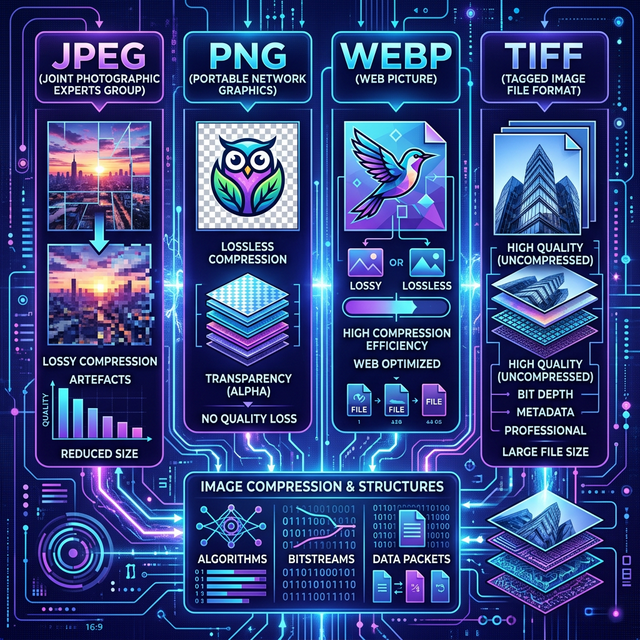
Every time you save an image, you face a choice that has real consequences for file size, visual quality, and compatibility: which format should you use? The three formats you'll encounter most often are JPEG, PNG, and WebP. Each has genuine strengths and specific situations where it shines β and real weaknesses that make it the wrong choice in other contexts.
This guide cuts through the confusion with a clear, practical breakdown of when to use each format, backed by real-world comparisons.
JPEG β The Universal Photograph Format
JPEG (Joint Photographic Experts Group) has been the dominant image format since the mid-1990s, and for good reason. It uses lossy compression, meaning it strategically discards image data that the human eye is least likely to notice β particularly fine detail in busy or textured areas. The result is dramatically smaller files with visually acceptable quality for most photographs.
A typical photograph from a modern smartphone camera might be 6β10MB in RAW or uncompressed TIFF format. The same image saved as a JPEG at 80% quality might be just 500KB to 1.5MB β a reduction of 80β90% with almost no perceptible difference to the naked eye.
When to use JPEG:
- Photographs and complex images β portraits, landscapes, product photos, food photography. JPEG's compression performs best on images with many colors and fine gradients.
- Email attachments and social media uploads β where file size matters and a small quality reduction is acceptable.
- Any file that does not require a transparent background.
When NOT to use JPEG:
- Logos, icons, and line drawings β JPEG compression creates ugly artifacts (visible blurring and "ringing") around sharp edges and solid color blocks.
- Anything with text overlaid on it β text becomes blurry and pixelated.
- Images requiring a transparent background β JPEG does not support transparency. Any transparent area will be filled with a solid color (usually white or black depending on the software).
- Images you plan to re-edit repeatedly β every save of a JPEG introduces additional compression loss (generational loss), degrading quality over time.
PNG β The Lossless Standard for Sharp Graphics
PNG (Portable Network Graphics) was designed as an improvement over the GIF format. Unlike JPEG, PNG uses lossless compression β it reduces file size without discarding any image data. Every pixel you save is identical to the original. PNG also natively supports full transparency (alpha channel), making it the standard choice for website graphics, logos, UI elements, and any image that needs to be placed over a colored or patterned background.
When to use PNG:
- Logos, icons, and flat illustrations β PNG handles solid colors and sharp edges without any compression artifacts.
- Screenshots β text and UI elements remain perfectly sharp.
- Images with transparent backgrounds β essential for images that overlay other content.
- Images that will be edited further β no generational quality loss.
When NOT to use PNG:
- Photographs for the web β a PNG photograph is dramatically larger than its JPEG equivalent, often 5β10Γ the file size, with no visible quality improvement.
- Anywhere page load speed is critical β oversized PNG photographs are one of the most common causes of slow websites.
WebP β The Modern Default for the Web
WebP is an image format developed by Google and released in 2010. It was specifically engineered for use on the web, providing both lossy and lossless compression in a single format. WebP supports transparency (like PNG) and animation (like GIF), making it remarkably versatile.
The headline number: WebP images are on average 25β35% smaller than comparable JPEG images at equivalent visual quality, and 26% smaller than equivalent PNGs. This is achieved through a more sophisticated compression algorithm that analyzes blocks of pixels more intelligently than JPEG's older method.
As of 2026, WebP is supported by all major modern browsers β Chrome, Safari, Firefox, Edge, and Opera. Support is no longer a concern. If you are building or optimizing anything for the web, WebP should be your default format for most images.
When to use WebP:
- All website images β hero images, blog thumbnails, product photos. The smaller file sizes directly translate to faster page loads and better Core Web Vitals scores.
- Social media assets β many platforms now accept WebP natively.
- Any image where you want the best compression-to-quality trade-off.
When NOT to use WebP:
- Printing β print shops use CMYK workflows and expect TIFF or high-quality JPEG. WebP is not supported in professional print pipelines.
- When recipients use older software β some older image editing programs cannot open WebP files.
- Government portals and official submissions β many still require JPEG or PNG explicitly.
Side-by-Side Comparison
To make this concrete, here are approximate file sizes for the same 1920Γ1080 photograph processed at equivalent visual quality:
- PNG (lossless): ~3.2 MB
- JPEG at 85% quality: ~420 KB
- WebP at 80% quality: ~290 KB
- WebP lossless: ~2.4 MB
The numbers confirm: for a typical web photograph, WebP lossy delivers the smallest file. Use our Smart Image Compressor to convert any image to WebP directly in your browser and see the saving in real time.
Quick Decision Guide
- Is it a photograph for a website or app? β Use WebP
- Does it need a transparent background? β Use WebP (or PNG if transparency + older software compatibility is required)
- Is it a logo, icon, or line drawing? β Use PNG or SVG
- Is it for print? β Use JPEG at high quality (90%+) or TIFF
- Are you unsure or need maximum compatibility? β Use JPEG
Conclusion
The "best" image format depends entirely on what you are trying to achieve. For modern web use, WebP is almost always the right choice β it gives you the file size advantages of JPEG with the transparency capabilities of PNG. For logos and graphics where pixel-perfect sharpness matters more than file size, PNG remains the gold standard. And for broad compatibility and photography workflows, JPEG continues to be a reliable choice. Use the Convert from JPG or Convert to JPG tools to switch between formats instantly.
Comments
Loading commentsβ¦